


Part 1 of 2, This part is the full foundation: why web data still matters, how the web actually serves it, how to fetch it cheaply, how to turn a page into a typed record, how to pull from many sources without making a mess, and what breaks when you run it for real. Part 2 builds the trust layer on top. Read this one first.
A founder at a two-person startup asks an agent to find 50 companies that would make good early customers. The agent reads the web, pulls together names, roles, and emails, and hands back a clean list of 50. It looks perfect. She sends the first ten emails that afternoon.
Four bounce. One company shut down last year. One “contact” is a job title the scraper lifted off a navigation bar. One reply is a stranger asking why they got this. The agent did not lie, exactly. It read a stale profile, a blocked page, and a redesigned layout, and it reported all of it with the same confidence as the good rows. Nothing looked wrong until the replies came back.
This guide is about that gap, between a list that looks right and a list you can act on. It is the most common thing people build agents for right now, and it makes a good first project because every hard part of production data work shows up in it: fetching, cost, extraction, schema, drift, and the quiet failures above.
We will build that agent the way a forward-deployed engineer would. Start from the customer. Tie every decision to a bar. Know what breaks six months in.
The running example is a sourcing agent for a B2B developer-tools startup, hunting design partners, the early customers who will use the product and push on it. It reads public web pages, finds companies that fit, finds a real contact, and writes a list the founders can act on.
By the end you will have an agent that gets clean, current, structured data off the open web at a controlled cost. It will still have the gap from that opening scene, the one that let the bad rows through, and closing it is the whole of Part 2. Getting the data is the hard part, so this part is long and covers it in full.
Start with the customer
Before any code, write down who you are building for and what counts as done. This is the habit that separates an engineer from a tutorial. Every choice later points back to this box.
Customer: a two-person developer-tools startup. They need 50 qualified design partners a week. Nobody has time to check the list by hand.
Budget: about $50 a week for data and compute.
The bar: at least 95 percent of the companies on the list are real, current, and a genuine fit. Each one comes with evidence. The whole run finishes in under 30 minutes. No manual cleanup.
Biggest risk: stale or made-up data the agent reports with confidence.
What failure looks like: the founder emails a bad list, burns a morning, and stops trusting the agent.
That box is your reliability bar. It is the number the finished agent has to hit, and it is the reason every decision in this guide has a right answer you can point to. A fetch that costs two cents a page fits the budget. One that costs thirty cents a page does not. A field you cannot trust to 95 percent is not done, however clean it looks.
Hold the bar in mind for the rest of this part. By the end you will have an agent that gets the data. You will also be short of 95 percent, because hitting the bar is a precision problem, on top of a data problem, and precision is what Part 2 is for.
Why web data still matters when models are this good
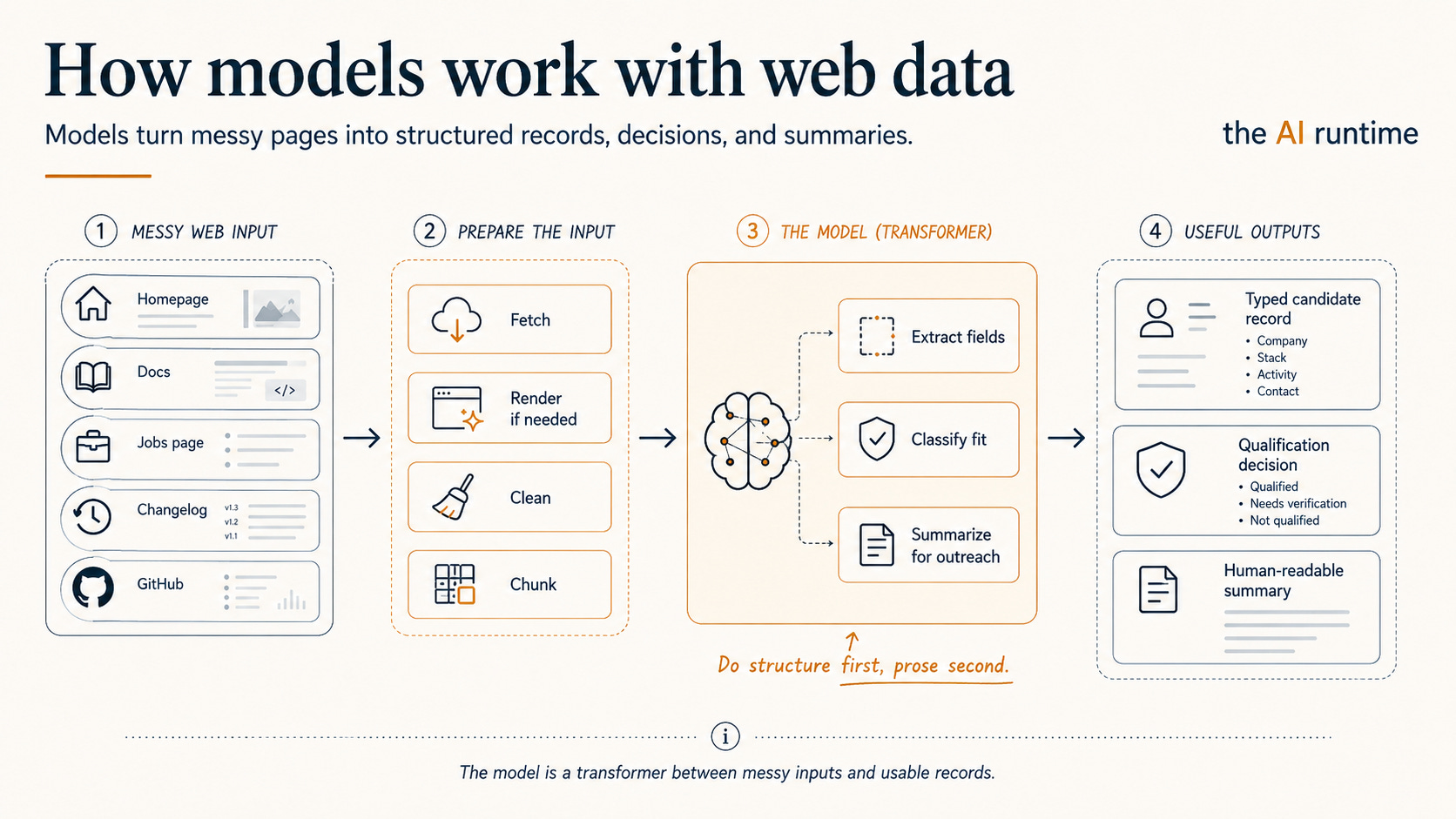
It is tempting to think scraping matters less now that a model can read and summarize on its own. The opposite is true. A model makes good web data more useful and bad web data more dangerous, because it will turn either one into a confident, clean-looking record.
Give a model a stale page and it writes a stale answer with no hedge. Give it a block page and it summarizes the block page. Give it a half-rendered shell and it concludes the company has nothing to say. Feed it raw HTML full of nav bars, cookie banners, and footers, and it often extracts the wrong thing. The model only sees what you hand it. So the whole job is handing it the right thing, and that job lives entirely upstream of the model.
That upstream work has two halves. Get the right data off the web. Turn that data into structured records a model or a workflow can use. Most people focus on the second half and underbuild the first, and then wonder why the agent falls over in week two when a page they never tested quietly changes shape (Scrapfly).
The whole pipeline, so you can see where you are
A sourcing agent is not one model call. It is a pipeline, and getting the data is the top of it.
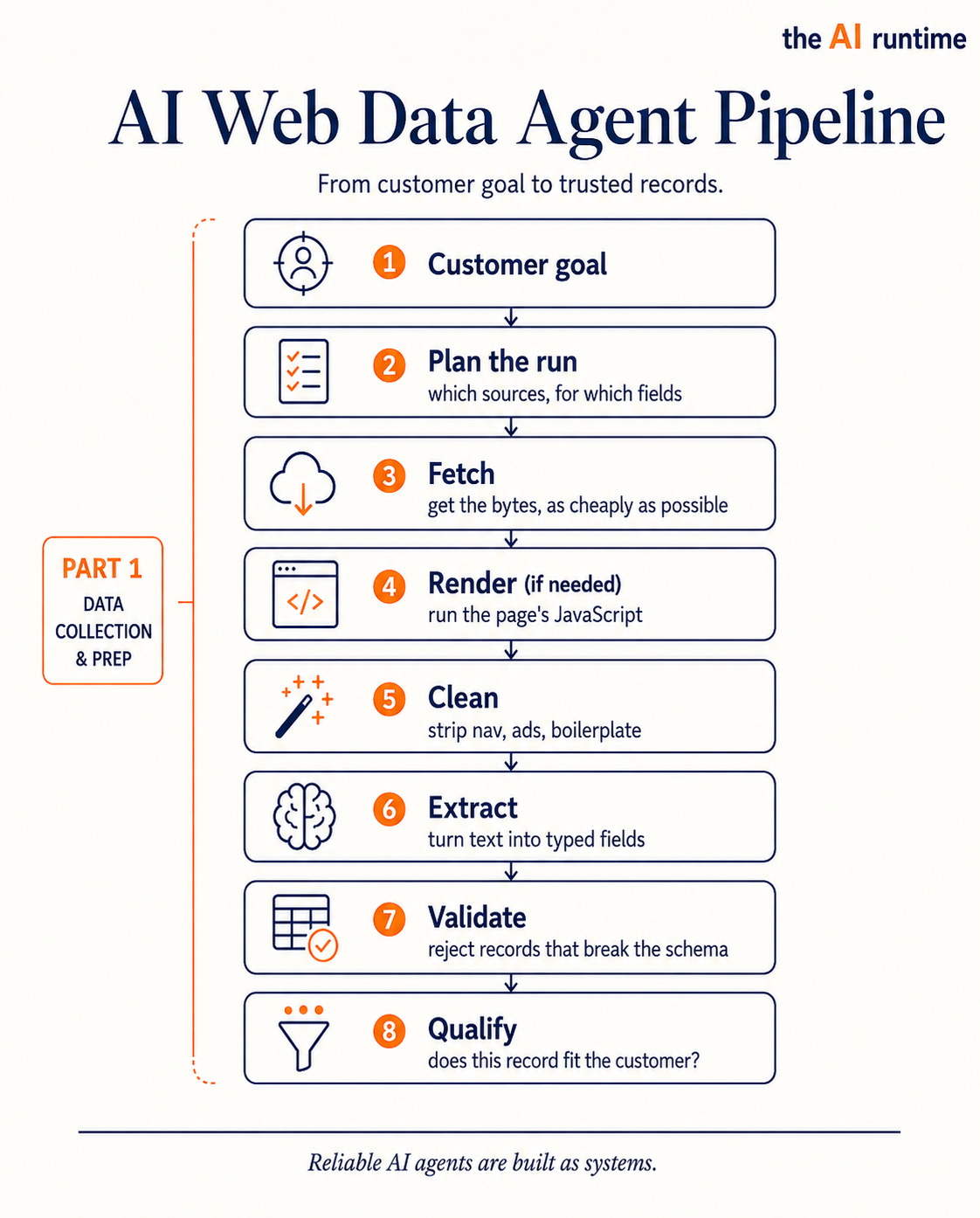
Part 1 is plan, fetch, render, clean, extract, validate, qualify. Part 2 is verify and store, the trust layer that decides what to believe. This guide covers the top half in depth.
How the web actually serves data
When your agent asks for a page, one of four things is true underneath, and each one costs you differently. Knowing which case you are in is the single biggest lever on cost and reliability, so it is worth understanding before you react to it.
Plain HTML. The server sends back a full HTML document with the content already in it. Your company description, team, and pricing are right there in the source. A plain HTTP GET is enough. This is the cheapest and most reliable case, and it is more common, especially on smaller sites and anything server-rendered.
JavaScript-rendered. The server sends back a near-empty shell plus a bundle of JavaScript. The browser runs that JavaScript, which then fetches and draws the real content. This is how most modern web apps work. If your agent grabs the raw HTML, it sees the shell and almost nothing else. To read these pages you need a headless browser: a real browser engine, usually Chromium, running without a screen. It loads the page, runs the scripts, waits for content, and hands you the finished DOM. This always works, and it is slow and expensive, because you are paying to run a whole browser for every page, and headless costs climb steeply the moment a browser is involved (Olostep). Reaching for it by default is the most common way ingestion costs run away.
A hidden JSON API. That JavaScript-rendered page did not invent its content. It called an internal endpoint to get it, usually something that returns clean JSON, and then drew that JSON onto the page. If you open your browser’s developer tools and watch the network tab while the page loads, you will often see that call: a request to something like /api/companies/123 or /graphql that returns the structured data you were about to scrape painfully out of the rendered HTML. Call that endpoint directly and you skip the browser entirely. You get structured JSON instead of DOM to parse, at a fraction of the cost, and hitting that endpoint directly is faster than picking apart the rendered page (Olostep). It also tends to break less, because an internal API changes shape less than a page layout does.
What an FDE does here. Most demos launch a headless browser on the first hard page. An FDE spends five minutes in the network tab first, because finding a hidden JSON endpoint often cuts the cost of a page by ten times and makes it more reliable at the same time. At a $50 weekly budget, five minutes of looking pays for itself on the first run.
The site blocks you. Step back for a second, because this is the root of most of the pain. The web was built for people to look at. Programs were never the intended reader. Every page is a human interface: it assumes eyes, a mouse, a real browser, and a person who clicks to load more. Your agent has none of that. It shows up as a program asking for data a site never meant to hand a program, so it has to act human enough to be served, and many sites are actively trying to tell the difference.
That is why sites fight automated traffic. You get a 403, a CAPTCHA, a login wall, a rate-limit page, or, worst of all, a block page that still returns HTTP 200 and looks like a real response. Roughly a fifth to two fifths of popular sites run some form of bot protection (Context.dev). Getting blocked means getting no data, or worse, getting a block page your agent reads as content. Handling this well means making the agent look like a person: rotating IP addresses, presenting realistic browser headers, backing off between requests, and solving challenges. That work is genuinely hard and never finished, because it is an ongoing contest between scrapers and the sites trying to spot them, and it is the main reason most teams pay a service to fetch rather than build and babysit it.
Two more sources of clean data worth checking before you crawl anything. Many sites publish a sitemap, an XML file listing every page they have, which saves you from discovering URLs by following links. Many publish feeds, RSS or JSON, which give you fresh content in a structured form for free. Check both before writing a crawler.
The fetch ladder
Put those cases together and you get a fetch ladder. For each source, try the cheapest path first and fall down a rung only when the rung above comes back empty.
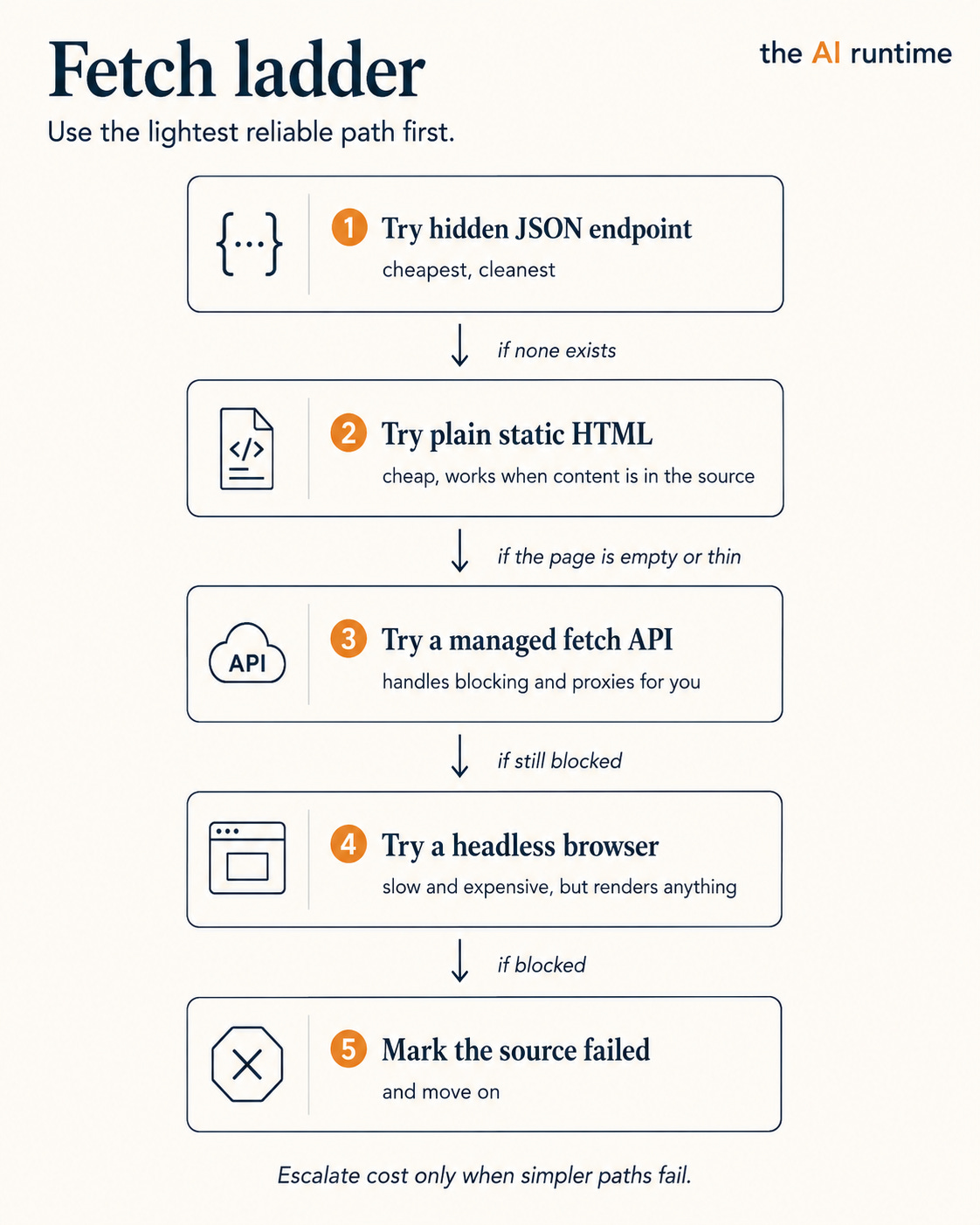
The ladder does two useful things at once. It keeps cost down, because most pages get answered on a cheap rung and only the stubborn ones reach the expensive rungs. And it makes failure legible: a source that falls all the way to the bottom is one you now know is hard, rather than a silent line item bleeding your budget. Launching a browser for every page, which is what a naive build does, is the opposite of this. It works in a demo and it is slow and costly the moment you scale past a handful of pages.
The tools, and how to choose
You do not build the fetch layer from scratch. There is a market of tools, and they fall into groups that map onto the ladder above.
Managed scraping APIs. You send a URL, they return the page, often already cleaned to Markdown or JSON. They own the browser fleet, the proxies, the anti-bot handling. Apify, Firecrawl, Bright Data, Tavily, and Exa live here, and they specialize differently: some are built to defeat hard bot protection, some to hand clean text straight to a model, some keep large libraries of ready-made scrapers for specific sites, some are really search-and-discovery layers.
A tool like Apify is not worth paying for because it can fetch a page. Your team could write a fetcher in an afternoon. It is worth paying for because it saves that team months of building and maintaining the miserable parts underneath fetching: proxy rotation, a browser fleet, retries, anti-bot handling, and run scheduling. That is the thing a customer actually pays to skip.
Open-source libraries. If you want to own the pipeline and run it yourself, libraries let you write fetch and parse code by hand. More control, more work, and you are the one maintaining it when a site changes.
Headless browsers. Playwright and Puppeteer drive a real browser for the JavaScript-rendered pages. You reach for these on the bottom rung, when nothing lighter returns the content.
No-code scrapers. Point-and-click tools for simple, repeating jobs. Fine for a one-off spreadsheet export, too rigid to sit inside an agent.
To choose, start from the end. What are you fetching, how much control do you need, and where does the data go (Firecrawl)? If it feeds a model, prefer a tool that returns clean Markdown or JSON, because raw HTML wastes tokens and lowers extraction quality; one 2025 benchmark found flat JSON scored around 0.96 F1, far above raw or slimmed HTML (Olostep). If you are hitting a few known, stable pages, a small library is plenty. If you are fighting protected sites at volume, buy the fetch layer and move on.
What an FDE does here. The question a customer pays you to answer is not which scraper. It is build or buy. At $50 a week with nobody to maintain code, you buy the fetch layer and spend the budget on the agent. At enterprise scale with a team behind it, that math can flip toward owning the infrastructure. Knowing where the line sits for this specific customer is the job.
Put every fetcher behind one interface
One design choice makes the whole tool question smaller. Put every fetch method behind a single interface, so the rest of your agent never learns how a page was fetched. A static request, a hidden endpoint, an Apify run, a headless browser, and a search API all return the same normalized object.
@dataclass
class FetchResult:
    source_url: str
    fetched_at: datetime
    fetch_method: str          # "static" | "hidden_api" | "apify" | "browser" | "search"
    status: str                # "success" | "blocked" | "empty" | "error"
    content_type: str          # "html" | "json" | "markdown"
    raw_content: str
    cost_estimate: float       # what this fetch cost, so you can sum it per run

class Fetcher(Protocol):
    def fetch(self, source: Source) -> FetchResult: ...

# concrete fetchers implement the same contract
class StaticHttpFetcher:  ...
class HiddenApiFetcher:   ...
class ApifyFetcher:       ...
class BrowserFetcher:     ...
Now the tool sits behind that contract as a replaceable part. Apify for the hard sites, a hidden endpoint for the cheap ones, a search API for discovery, each returning the same FetchResult. Swap one for another and nothing downstream changes. It also gives you the fetch ladder for free: try HiddenApiFetcher, and on an empty or blocked status, fall to the next fetcher. And because every result carries cost_estimate and status, your metrics come from the same object, with no extra plumbing.
Turning a page into records
Once you have the bytes, you turn them into fields: company name, size, a contact. Before extraction, clean the content. Strip scripts, style tags, nav, cookie banners, and footers, and convert to readable text or Markdown. This matters for two reasons. Raw HTML wastes tokens, and it lowers accuracy, because the model has to find the real content inside a pile of boilerplate. Clean input is cheaper and more reliable input.
Then extract. There are three ways, on a ladder of cost, flexibility, and reliability.
Selectors (CSS or XPath). You tell the code exactly where each field lives in the HTML, by its structural path. Fast, cheap, and fully deterministic, which means it returns the same answer every time. The weakness is brittleness. The path that read a company’s headcount last month reads an ad slot this month, quietly, after a redesign, and now you are writing garbage into the right field with total confidence (Browser Use). Selectors are the right tool when you know the URLs and the HTML is stable.
Model extraction. You hand the cleaned page to an LLM and describe the fields you want in plain language. It finds them. This bends with the site, so small layout changes do not break it, and you write no per-site rules. The cost is real on two axes: it is probabilistic, so the same page can yield slightly different output twice, and it is expensive per page at volume.
The hybrid, for production grade. Use selectors for the fields you can pin, and fall back to model extraction only when a selector fails or the page is unfamiliar. You get the cheap, exact path on the common case and the flexible path on the long tail, instead of paying model prices for every field on every page.
Pick the rung by the source. Stable, known pages want selectors. A rotating set of differently-built sites wants the model. Most real agents run both, chosen per source.
One rule about how the model fits in the pipeline. The model is a translator between messy input and typed records. It is not your database. A common mistake is to ask the model for a paragraph describing a company and then treat that paragraph as data. Do it the other way around: extract typed fields first, validate them, and generate any human summary from the structured record afterward.
Structure first, prose second.
The schema is the contract
This is the part the “just scrape it” approach skips. Define the record you want up front, before you scrape, and validate every extracted record against it.
A schema is a typed model with required and optional fields, enums instead of free strings, and bounded numeric types. For the sourcing agent:
class Signal(BaseModel):
    type: Literal["stack", "activity", "stage", "contact", "positioning"]
    value: str
    source_url: str
    fetched_at: datetime

class Candidate(BaseModel):
    company_name: str
    domain: str
    category: str
    description: str
    signals: list[Signal]                       # each fact carries where it came from
    contact_name: str | None = None
    contact_role: str | None = None
    contact_url: str | None = None
    contact_email: EmailStr | None = None
    source_urls: list[str]
    fetched_at: datetime
    model_config = ConfigDict(extra="forbid")   # reject invented fields
The schema does three jobs. It forces the model to produce records instead of prose. It gives your system a clean way to reject bad records: a missing required field, a malformed email, a company size outside a sane range, all fail validation instead of flowing downstream. A scraper’s real output is a field contract plus a quality check, which is exactly what a schema encodes (GroupBWT). And it is a contract for whatever comes next, the spreadsheet, the CRM, and the Part 2 trust layer, so those systems can rely on the shape.
Handle the edges deliberately. A record missing a required field is not a record, so decide up front whether it is dropped, held, or escalated, rather than letting a null pass as data. Set extra="forbid" so a field the model hallucinates gets rejected rather than silently stored. And when a validation fails, keep the raw model output next to the error, because that pair is the fastest way to see drift and recurring failure modes (bix-tech).
Schema drift is the failure this layer exists to catch. Sites get redesigned, an internal API renames a field, an extractor starts returning the wrong type. Because you validate every record against a typed contract, drift shows up as a spike in validation failures you can see, instead of corrupted data you cannot. Version the schema, so a redesign forces an explicit change rather than quietly poisoning the dataset.
Pulling from many sources without making a mess
The first version of a sourcing agent reads one source. The real version reads many, because each source answers a different question.
Source What it tells you Homepage Positioning and category Docs Technical depth and stack GitHub Engineering activity Changelog Whether the product is alive Jobs page Stack they hire for, growth signal Funding or news Stage and momentum Team page A real contact
The model can combine these signals, but only if the pipeline preserves where each one came from. So do not collapse everything into one blob of text. Keep the record source-aware: every signal carries its own value, source, and URL, which is exactly what the Signal type above does. That structure is what lets Part 2 later ask the questions that matter, did two sources agree, is this source fresh, is the contact still listed. Without per-signal provenance, you cannot ask any of them.
Manage the sources with a small registry instead of letting the agent “browse around.” The registry says, for each source, how to fetch it, how fresh it needs to be, and which fields it supplies.
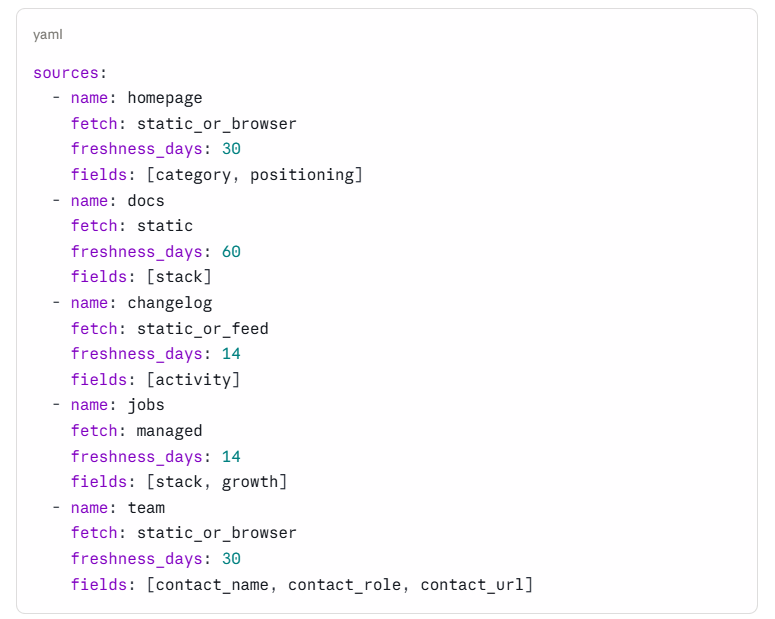
Now the planner decides what to fetch based on what it still needs. Need the category, fetch the homepage. Need the stack, fetch docs or jobs. Need a contact, fetch the team page. This is cheaper and far more observable than turning a model loose to wander a site, because every fetch is deliberate and every source is accounted for.
The first working pipeline
Here is the simplest version that is actually a pipeline and not a prompt.
for source in planner.sources_for_run():
    result = fetcher.fetch(source)                            # runs the fetch ladder
    metrics.record(result)                                    # status + cost, every time

    if result.status != "success":
        continue                                              # failure already recorded

    text = cleaner.to_text(result.raw_content)                # strip boilerplate
    record = extractor.extract(text, schema=Candidate)        # selectors + LLM fallback

    if not validator.valid(record):
        metrics.record_schema_failure(source)
        continue

    if qualifier.fits(record, rubric=DesignPartnerRubric):
        evidence_store.save(raw=result.raw_content, record=record)
        sink.write(record)
This is not clever, and that is the point. The value is that each step fails on its own and can be measured on its own. Compare it to the version that fails: one prompt that says “go find me 50 companies.” That hands the model all the responsibility and gives you no control, no cost ceiling, no way to see which step broke. A pipeline decomposes the work into stages you can test, measure, and improve one at a time. Find sources, fetch, clean, extract, validate, qualify, store. Each is a place you can put a number.
Cost, in the ways it actually runs away
Web agents get expensive in boring, predictable ways. Each has a fix, and each fix ties back to the $50 bar.
Rendering every page. Headless browsers cost far more than plain requests. Route everything through one and the cost curve turns ugly fast. The fix is the fetch ladder: render only when the cheaper rungs come back empty.
Sending raw HTML to the model. Boilerplate burns tokens and lowers accuracy. Clean to text or Markdown before extraction. A cleaner input is a cheaper and better input at the same time.
Letting a crawl expand without limits. Follow every link and one homepage becomes three hundred pages, each rendered, each extracted, and the weekly budget is gone on a single company. Set explicit budgets: max pages per domain, max depth, max rendered pages per domain, max model tokens per domain. A crawl without a budget is an outage waiting to bill you.
Reprocessing what has not changed. Fetching the same homepage daily when nothing changed is pure waste. Cache by content hash, and use conditional requests, ETag and Last-Modified, to pull only when the content actually changed (incremental scraping). Reprocess on a real change or when a freshness window expires, and not otherwise.
Retrying blindly. A retry helps a timeout. It does nothing for a block page except spend money. Classify every failure and act on the label:
timeout      -> retry with backoff
rate limit   -> back off, slow down
captcha      -> stop, escalate, do not auto-retry
403 / login  -> mark the source protected, try a managed fetch once
404          -> mark the source dead
empty body   -> try one rendered fetch, then give up
Firing the same blocked request ten times is one of the most common ways a small budget vanishes in an afternoon.
The metric that ties cost to the customer is cost per accepted candidate. Page counts and model-call counts are easy to measure, and the founder does not care about either. They care how many usable names they got for fifty dollars.
Optimize that ratio and you are optimizing the business outcome, which is the only cost number the bar actually mentions.
Reliability, or how clean-looking data goes wrong
Cost failures show up in your bill. Reliability failures are worse, because they produce clean-looking bad data that sails through to the founder. These are the ones to design against, and each has a concrete defense you can build in Part 1.
Empty pages read as “no data.” A JavaScript page returns a shell, and the agent concludes the company has nothing to say. Detect thin pages: if the text length is below a threshold, or the title is missing, or the ratio of real text to boilerplate is low, drop to a rendered fetch before trusting the result.
Block pages read as content. A blocked request returns a “verify you are human” page with a 200 status, and the agent summarizes it as the company. Keep a small list of block-page fingerprints, CAPTCHA phrasing, access-denied titles, known challenge markers, and fail any response that matches.
Stale information. A page lists an old customer, a departed team member, or last year’s positioning. Track freshness. Prefer pages with visible dates, recent changelogs, active repos, or recent job posts, and record fetched_at on every field so Part 2 can reason about age.
Layout drift. A selector that worked yesterday reads the wrong field today. This is why you validate every record: when a company size suddenly arrives as a paragraph, or an email as a footer link, the schema check fails the record instead of storing nonsense.
Duplicate companies. The same company shows up across a directory, GitHub, and a blog. Deduplicate by normalized domain first, then by company-name similarity, so one company is one row.
Made-up contacts. A model, asked for a contact, may infer a plausible name rather than extract a real one. Require that a contact be grounded in a page you fetched. If it is not on a source, it does not go in the record as fact. This one is the seam into Part 2, and it is the difference between a list a founder can send and a list that bounces.
Notice that most of these defenses are cheap, deterministic code that runs before any model call. That is deliberate. A deterministic floor catches a large share of failures before you spend a cent on a model (FutureAGI), which is both cheaper and more reliable than asking a model to catch its own bad input.
FDE decision log
An FDE can defend every choice in a build, and writes the important ones down. Here are the load-bearing decisions in this part.
Decision:       Buy the fetch layer (managed API) for hard sites
Alternatives:   Custom Playwright + proxy stack, Firecrawl, Bright Data
Chosen because: Two-person team, $50/week, nobody to maintain scraping infra.
                Buying spends the budget on the agent and the time on the bar.
Tradeoff:       Higher variable cost per page, much lower maintenance.
Revisit when:   Volume passes ~100k pages/day, or per-page cost crosses the
                point where owning the infra pays off.

Decision:       Check for a hidden JSON endpoint before rendering
Alternatives:   Render every page in a headless browser
Chosen because: A hidden endpoint is ~10x cheaper and usually more stable
                than parsing a rendered DOM.
Tradeoff:       Five minutes of manual inspection per new source type.
Revisit when:   Sources change shape often enough that the inspection
                cost outweighs the savings.

Decision:       Schema-first extraction with per-signal provenance
Alternatives:   Free-form model summaries treated as data
Chosen because: The bar needs 95% precision and evidence per field, and a
                typed record is what makes a claim checkable in Part 2.
Tradeoff:       More upfront design than prompting for a paragraph.
Revisit when:   The schema turns out too rigid for a new source's shape.

Decision:       One fetcher interface, tools behind it
Alternatives:   Wire each tool directly into the pipeline
Chosen because: Makes every tool a replaceable part and gives the fetch
                ladder and metrics for free.
Tradeoff:       A small abstraction layer to maintain.
Revisit when:   You only ever use one fetch method (you will not).
None of these are about the tool. They are about the customer’s constraints.
What to watch from day one
Do not wait until the agent is “done” to add metrics. The first dashboard is simple, and every number on it comes from the FetchResult object and the validation step you already built.
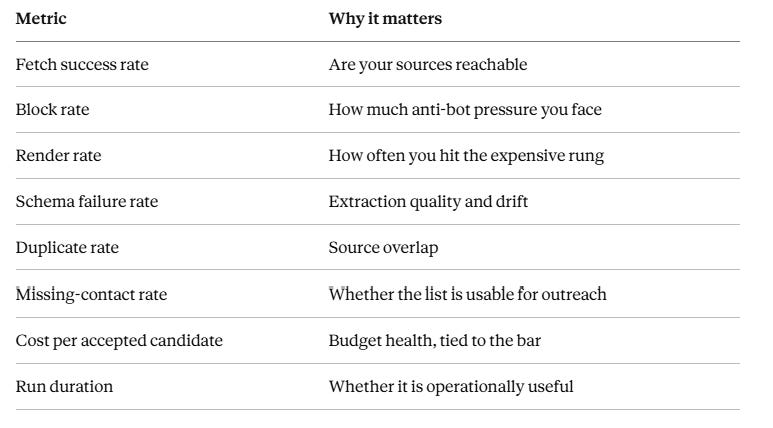
If you cannot see these, you cannot tell whether you are meeting the bar, and the bar is the job.
What this version can and cannot do
By the end of Part 1 you have a real web data agent. It fetches from public sources, picks the lightest reliable fetch per source, cleans before extraction, extracts typed records, validates them against a schema, qualifies them against a rubric, keeps the raw evidence, and reports its own cost and reliability. That is more than most agents running in production have, and it is built like a system, with stages you can test and measure one at a time.
It has one gap, and the gap is the dangerous kind. It cannot yet prove that a record is true. A clean schema does not mean the data is current. A model-written reason does not mean the company qualifies. A source URL does not mean the page actually supports the claim. A successful fetch does not mean it was the right page.
Everything in this part assumes the web is telling the truth. Production systems break because the web often is not. Part 2 is about deciding when to stop believing what you found: confidence per field, checking a claim against the page behind it, agreement across sources, catching stale data, and routing the unsure cases to a human instead of guessing. You built the agent that gets the data. Next you build the layer that decides what to trust.