


The architect’s question that no OpenClaw writeup actually answers is: what should I build, and what should I buy, when I design my own agent runtime? OpenClaw is the most concrete, working, in-production answer to that question available right now. Treated correctly — as a reference architecture, not a tool to install — it decomposes into five reusable primitives you can implement in any language, on any infrastructure, with any LLM. This article does the decomposition, maps three production-grade use cases that move real numbers, and ends with a harness audit checklist you can run against any agent runtime you ship or evaluate.
TL;DR - Most OpenClaw articles describe the system. This one extracts the architecture. There are five primitives in any local-first agent runtime — Channel Adapter, Routing Plane, Reasoning Loop, Capability Registry, and State Store — bound together by a Trust Boundary that crosscuts all of them. OpenClaw made specific choices at each layer; some are excellent, some are pragmatic, some are workarounds you should not copy. This piece walks each primitive’s design choice space, the production pattern senior engineers learn the hard way, and what to swap if you are building your own. Then it lays out three use cases that earn their keep at scale: an on-call SRE companion that compresses MTTR on tier-2 alerts, a customer-account risk agent that intervenes before churn signals are obvious to a CSM, and an engineering productivity agent that reclaims hours of context-switching tax per senior engineer per day. Each comes with a production-grade SKILL.md asset and the harness considerations that decide whether it scales or breaks. Finally: an eight-question harness audit checklist, applicable to any agent runtime, that decides whether the system is production-defensible. The pattern is more valuable than the tool. Learn the decomposition.
The Five Primitives
Every local-first agent runtime that does real work has the same five primitives, regardless of language, framework, or vendor. OpenClaw is the worked example because it ships, scales, and exposes its seams clearly. The decomposition below applies equally to anything you would build on LangGraph, Microsoft Agent Framework, custom Python, or a hand-rolled runtime in Rust.
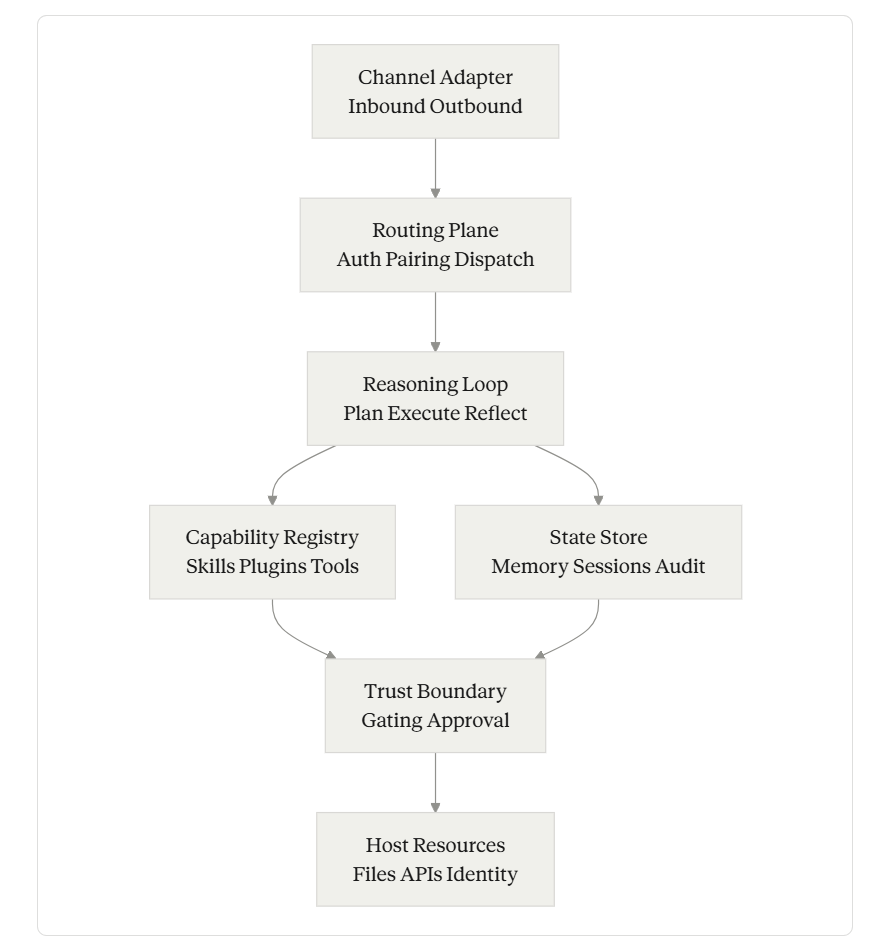
Primitives
Each primitive is independently designable. You can keep OpenClaw’s Channel Adapter and replace its State Store. You can swap its Reasoning Loop for a planner-executor split and keep everything else. The decomposition is the thing.
Primitive 1: Channel Adapter — Where Users Already Live
Definition. The component that translates between external messaging surfaces (WhatsApp, Slack, PagerDuty webhooks, Teams, email, terminal) and the runtime’s internal event format.
Design choice space. Most teams default to building a custom UI. That is the wrong answer for almost every agent. The choice space is roughly: (1) build a new app, (2) embed in an IDE or terminal, (3) ride existing messaging surfaces, (4) hybrid (multiple channels routed to one agent). OpenClaw chose option 3, with more than twenty channel integrations shipping out of the box.
The production pattern. The non-obvious thing senior engineers learn after shipping their first agent is that the channel determines the latency budget. A Slack thread implies near-real-time response (under 5 seconds). An email implies minutes. A PagerDuty webhook implies seconds. A long-running cron skill can take an hour. If your runtime forces every interaction through one latency budget, you will lose half your use cases. Channel Adapters should each carry their own latency expectation, retry policy, and inbox-vs-firehose semantics.
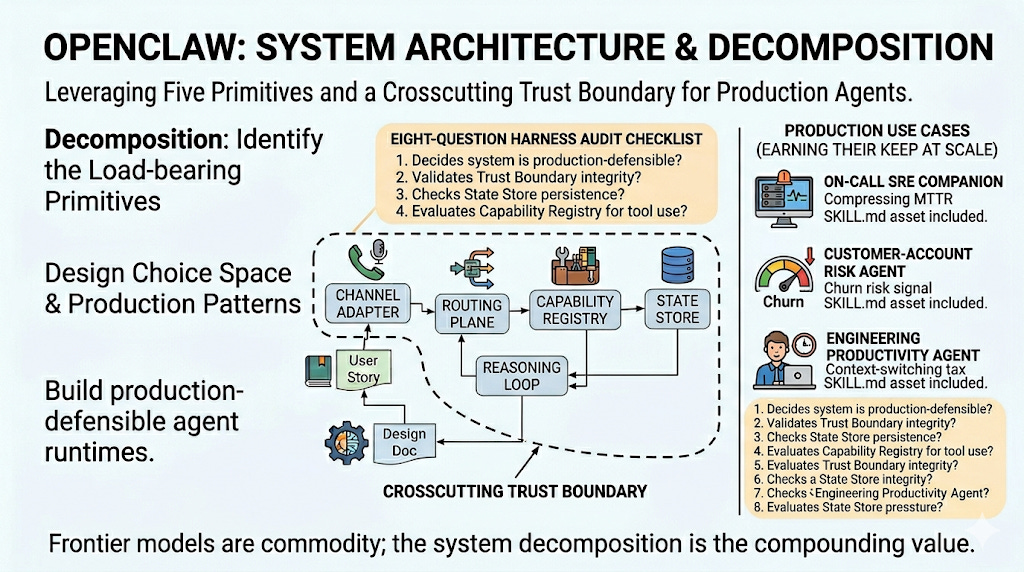
Openclaw System Architecture
What to swap. OpenClaw’s adapter layer is Node-native and tightly coupled to its Gateway. If you are building your own runtime, separate the wire-protocol concerns (parsing inbound payloads, formatting outbound messages) from the routing concerns (deciding which agent or skill the message belongs to). The wire-protocol layer should be replaceable per-channel without changing routing. Slack adapters get rewritten when Slack’s API changes; routing should not have to follow.
Asset for architects: treat each channel as a typed event with three fields — from, latency_class (realtime, near_realtime, async, batch), and payload. Routing dispatches on those three. Skills declare which latency_class they accept. Mismatches fail fast.
Primitive 2: Routing Plane — The Boring Layer That Decides Everything
Definition. The control plane that receives every inbound event, authenticates and authorizes it, decides which agent (or sub-agent) handles it, and dispatches.
Design choice space. Single-agent vs multi-agent. Stateless dispatch vs session-pinned dispatch. Centralized routing vs federated. OpenClaw chose a single long-running Node.js Gateway on localhost:18789 that holds all routing state in-process. That is the simplest possible answer. It works for a single user. It does not work for a team.
The production pattern. The Routing Plane is where multi-agent architectures live or die. If you are routing inbound events to specialist agents (a “research” agent, a “deploy” agent, a “review” agent), the routing logic determines whether you are running a coordinated team or just five disconnected bots that happen to share a Slack workspace. The pattern that earns its keep: declarative routing rules with a fallback agent, where every routing decision is logged with the decision rule that triggered it. If you cannot reconstruct from logs alone why a given event went to a given agent, you have built something you cannot debug.
What to swap. OpenClaw’s in-process routing should be replaced with an explicit message bus the moment you have more than one agent. NATS, Redis Streams, or even a SQLite-backed work queue is enough. The benefit is observability: every routing decision becomes a record you can replay. The cost is one more component to operate.
Primitive 3: Reasoning Loop — The Loop That Should Be Boring
Definition. The component that takes a routed event, assembles the context (system prompt + skill content + memory + session history + tool descriptions), invokes the model, parses tool calls, executes them, and decides whether to loop again.
Design choice space. ReAct loop, plan-then-execute, planner-executor split, recursive multi-agent, hierarchical task decomposition. OpenClaw uses a single-agent ReAct-style loop with the model deciding tool calls inline.
The production pattern. Three things that the surface-level architectural articles miss:
Context assembly is where most failures originate, not the model. The order in which you concatenate system prompt, skill content, memory, session history, and tool descriptions affects model behavior more than swapping models. Skill content placed before memory will override personalized preferences; skill content placed after will be diluted. Decide the precedence explicitly and document it.
Loop termination is a first-class problem. Default to hard limits (max iterations, max tool calls per turn, max wall-clock seconds) and treat hitting them as a bug to investigate, not a steady-state operating condition. An agent that needs forty tool calls to triage an inbox is not working; it is stuck.
Reflection is overrated; explicit checkpoints are underrated. The “agent reflects on its own work” pattern is academic. The pattern that earns its keep in production is explicit human-confirmable checkpoints — the agent stops, summarizes what it has done so far, and waits for confirmation before proceeding to any irreversible step. OpenClaw does this implicitly through its messaging-channel UX (you have to reply to approve); a serious runtime should do it explicitly through a tool-gating layer.
What to swap. OpenClaw’s single-agent loop is fine for personal use. For team-scale work, separate planning from execution. A planner agent produces a typed plan (a list of steps with explicit dependencies); an executor agent runs each step with tool access scoped to that step alone. The blast radius of a bad plan stays in the plan; the blast radius of a bad execution stays in one step.
Primitive 4: Capability Registry — Where Trust Compounds or Collapses
Definition. The catalog of skills, plugins, and tools the agent can invoke, with their declared inputs, outputs, side effects, and trust level.
Design choice space. OpenClaw uses the AgentSkills standard: a skill is a directory containing a SKILL.md file with YAML frontmatter and instructions. ClawHub now hosts more than 31,000 skills discoverable through the public registry. The format is open and adopted across multiple AI coding assistants. The choice space is closed-set vs open-set, file-system vs database-backed registry, declarative vs programmatic, public registry vs private mirror.
The production pattern. The non-obvious lesson: the registry should make every capability addressable by a stable, versioned identifier, and the runtime should refuse to execute a capability that has been silently mutated since the agent loaded it. OpenClaw’s ~/.openclaw/workspace/skills/<skill-name>/ layout is fine for development but assumes implicit trust in whatever is in the directory. A production registry pins capabilities to content hashes at load time, and any mid-session mutation either invalidates the session or is ignored.
The harder pattern: capabilities should declare their side-effect class explicitly, not implicitly via natural language. A capability should be tagged read-only, local-write, external-write, destructive, or irreversible. The Reasoning Loop and Trust Boundary use these tags to decide what gets auto-approved versus what waits for human confirmation. Skills that do not declare their class get the most restrictive default.
What to swap. OpenClaw’s discovery model — skills loaded from a public registry installable in a single command — optimizes for ecosystem growth. For team or enterprise use, swap the public registry for a vetted internal mirror. Pull from upstream selectively. Sign every skill at ingestion. Run the dangerous-code scanner the project itself ships, plus your own static-analysis tooling. Cisco research found 11.3% of public skills were malicious — the rate at which a vetted internal mirror should be roughly zero, and you will know if it isn’t.
Architect’s asset: capability metadata schema worth stealing.
---
name: capability-name
version: 1.4.2
content_hash: sha256:abc123...
side_effect_class: external-write   # read-only | local-write | external-write | destructive | irreversible
latency_class: near_realtime
required_credentials: [hubspot:read, hubspot:write]
auto_approval_policy: never          # always | with_dry_run | never
maintainer: platform-eng@company.com
---
Every capability the agent can invoke carries this header. The runtime enforces it.
Primitive 5: State Store — Memory Is a File, Sessions Are Audit Logs
Definition. The persistent layer that holds long-term memory (preferences, learned context), short-term session history (current conversation), and the audit log (every event, decision, and tool call the runtime has executed).
Design choice space. File-system Markdown vs relational database vs vector store vs hybrid. OpenClaw chose plain Markdown for memory and JSON files for sessions, with vector storage available as an optional plugin. The radical simplicity of cat MEMORY.md is the most copyable design decision in the project.
The production pattern. Two things to internalize:
Long-term memory and audit logs have opposite design pressures. Memory wants to be small, curated, and editable. Audit logs want to be append-only, high-volume, and immutable. Treating them as the same store will break one or both. Keep them separate from the start.
The audit log is the recovery story. When a malicious skill or a poisoned memory file modifies agent behavior, your only path back to a known-good state is replaying the audit log up to a checkpoint and forking from there. If your audit log isn’t structured enough to replay, you do not have a recovery story; you have a re-install procedure.
What to swap. OpenClaw’s Markdown memory is excellent. Steal it. The session/audit JSON is fine for single-user; for team use, route everything through an append-only log (a SQLite table with a content-hash chain is sufficient at small scale; ClickHouse or Loki at larger scale). The audit log should record at minimum: event id, timestamp, source channel, routed agent, capability invoked, capability version+hash, side-effect class, approval status, outcome.
Three Production-Grade Use Cases
The “draft my email” demos are why most agent writeups feel useless. The use cases below were chosen because each one moves a number a CFO would care about, each one exercises all five primitives, and each one ships with a SKILL.md asset that is closer to production than to tutorial.
Use Case 1: On-Call SRE Companion
The pain. Senior SREs spend 30–50% of their on-call time on alerts that follow well-documented runbooks. Tier-2 alerts (services degraded but not down) often sit for fifteen minutes while the on-call human reads the runbook, checks dashboards, and determines whether the standard remediation applies. MTTR on these alerts is the bottleneck for service availability metrics.
What the agent does. When PagerDuty fires a tier-2 alert, the agent receives the webhook, retrieves the corresponding runbook from the internal docs system, executes all read-only diagnostic steps automatically (dashboard checks, log queries, recent-deploy correlation), and posts a structured triage summary to the incident Slack channel before the human SRE has logged in. Any write operation (restart pod, toggle feature flag, scale deployment) requires explicit human confirmation via Slack reaction.
Real value. Compresses MTTR on tier-2 alerts from a typical 25–35 minutes to under 10 by pre-loading the SRE with the diagnosis. At scale (a service handling 200 tier-2 alerts/month), 25 minutes of saved senior-eng time per alert is roughly 80 hours of senior eng capacity reclaimed per month per on-call rotation.
---
name: tier2-incident-triage
version: 2.1.0
side_effect_class: read-only           # writes require human confirmation
latency_class: realtime
auto_approval_policy: with_dry_run
required_credentials: [pagerduty:read, k8s:read, datadog:read, slack:write]
---

Triggered by: PagerDuty webhook, severity=tier-2.

1. Parse alert: extract service name, alert type, runbook URL.
2. Fetch runbook from docs system. If missing, post "RUNBOOK MISSING" and escalate.
3. Execute read-only diagnostic steps:
   - Last 3 deploys for service (git log via deploy-cli)
   - Service error rate over last 60min (datadog query)
   - Pod status and recent restarts (kubectl get -o wide)
   - Upstream/downstream service health (datadog dashboard snapshot)
4. Match diagnostic output against runbook decision tree.
5. Post to incident channel as a single threaded message:
   - One-line summary
   - Diagnostic findings (bulleted)
   - Recommended remediation (from runbook)
   - Confidence level (high/medium/low)
   - Awaiting confirmation: explicit list of write operations the agent could run if approved
6. WAIT. Do not execute any write operation without an explicit Slack reaction (✅) from on-call.
7. If 5 minutes pass without confirmation, escalate to secondary on-call.
The harness consideration: the agent runs with a dedicated service identity that has read access to all observability tools and write access to nothing. Write operations are gated through a separate, audited tool that requires a confirmed human approval token. Memory poisoning here is high-stakes: a successful attacker injection could alter the recommendation. The audit log captures the full diagnostic chain and the runbook version used; replays are possible.
Use Case 2: Customer Account Risk Agent
The pain. Customer Success teams chase churn signals reactively. By the time a CSM notices a weekly active user drop, an NPS dip, or a support sentiment shift, the renewal conversation is already adversarial. The signals are in the data; nobody has time to watch them.
What the agent does. The agent runs on a 4-hour cron, joins data across the CRM, support ticket system, product analytics, and contract management. For each account, it computes a composite risk score, identifies the dominant driver (engagement decay, support volume spike, executive churn, contract milestone approaching), and drafts a structured intervention recommendation. The draft is posted to the account-owning CSM’s Slack DM. The CSM approves, edits, or kills the recommendation; the agent never reaches out to the customer directly.
Real value. On a $10M ARR base with industry-typical 12% gross churn, recovering even 15% of at-risk accounts through earlier intervention is roughly $180K in retained ARR per year. At larger scale (any company with $50M+ ARR), the math justifies a dedicated platform engineer’s salary.
---
name: account-risk-scan
version: 1.3.0
side_effect_class: local-write           # writes are draft Slack DMs to CSMs only
latency_class: batch
auto_approval_policy: never              # always requires CSM approval
required_credentials: [hubspot:read, zendesk:read, mixpanel:read, contracts:read, slack:write]
---

Schedule: every 4 hours.

For each active account in tier "growth" or "enterprise":

1. Pull engagement signals (last 30d):
   - WAU/MAU trend
   - Feature adoption deltas
   - Login frequency by champion users
2. Pull support signals (last 30d):
   - Ticket volume vs prior period
   - Sentiment of last 5 tickets (use mood-scoring skill)
   - Open critical tickets
3. Pull commercial signals:
   - Days until renewal
   - Last QBR date
   - Recent executive changes (LinkedIn check via sales-intel skill)
4. Compute composite risk score (0-100) with explicit dominant-driver attribution.
5. If score > 60 AND no intervention has been logged for this account in the last 14d:
   - Draft a CSM-action recommendation:
     - Account name, risk score, dominant driver
     - Suggested next step (executive outreach / product training / pricing conversation / replacement-of-champion outreach)
     - Specific evidence (top 3 supporting signals)
     - Timing recommendation (this week / next week / before QBR)
   - Post as Slack DM to account-owning CSM with [Approve] [Edit] [Dismiss] reactions.
6. If CSM approves, log the intervention in HubSpot as a task with the agent's reasoning attached.
The harness consideration: this agent reads broadly across customer data and never writes to customer-facing systems. The Trust Boundary is conservative: even “log a HubSpot task” is gated through CSM approval. Audit logs record every account scored and every signal used, which doubles as compliance evidence for data-handling reviews. Memory carries a per-account intervention history so the agent does not re-recommend an action a CSM already dismissed.
Use Case 3: Engineering Productivity Agent
The pain. Senior engineers lose 1–2 hours per day to the context-switching tax: scanning Slack DMs, triaging the PR queue, checking CI failures, evaluating bug priority shifts, and managing calendar conflicts. None of these tasks individually require senior judgment, but in aggregate they consume the engineer’s most expensive cognitive capacity at the worst times of day.
What the agent does. Runs continuously in a Slack DM with the engineer. At configurable checkpoints (e.g., 9am, after lunch, 4pm), produces a triaged briefing: PRs needing review (sorted by author urgency and review effort), CI failures on owned services, calendar conflicts with proposed resolutions, Jira priority shifts in owned components, and a single “deep work block” recommendation for the next 2-hour window of clear calendar.
Real value. Reclaiming 60 minutes of senior engineering time per day across a team of 15 senior engineers, at a fully-loaded cost of $150/hr, is roughly $562K of capacity reclaimed per year. The harder-to-quantify benefit is morale: senior engineers who spend less time on triage stay longer.
---
name: eng-productivity-companion
version: 1.0.4
side_effect_class: local-write           # Slack DMs only, no other side effects
latency_class: near_realtime
auto_approval_policy: with_dry_run
required_credentials: [github:read, jira:read, datadog:read, calendar:read, slack:write]
---

Engagement model: persistent Slack DM with the engineer.

Triggers:
- Scheduled: 9am, 1pm, 4pm local time on workdays
- Event-driven: PR @-mention, CI failure on owned service, P0/P1 bug filed in owned component

For each scheduled briefing:

1. PR queue (sorted):
   - PRs awaiting review where this eng is on CODEOWNERS
   - Sorted by: author seniority match, days waiting, review-effort heuristic (lines changed × files changed)
   - Top 3 surfaced. Rest available on request.
2. CI/Service health:
   - Failing builds on owned services (last 24h)
   - Datadog incident page check for owned services
3. Priority shifts:
   - Jira tickets that moved to P0/P1 in owned components since last briefing
4. Calendar:
   - Conflicts in next 7 days, proposed resolutions
   - Largest contiguous deep-work block in next 24h, surfaced explicitly
5. Format as a single Slack message under 250 words. Use threading for "tell me more about X."

The agent never:
- Approves PRs
- Closes tickets
- Replies to messages on behalf of the engineer
- Modifies calendar events
The harness consideration: the trust boundary is the strictest of the three use cases — the agent is read-broadly, write-narrowly (one Slack DM, one recipient). Memory carries the engineer’s preference profile (review style, focus times, “do not bother me with X” filters). The audit log is per-engineer and is part of the trust contract: the engineer can read everything the agent has read about them.
The Harness Audit Checklist
Eight questions. Run them against any agent runtime — OpenClaw, your own, a vendor’s — to decide whether it is production-defensible. The questions do not mention OpenClaw because the test is general.
1. Identity scope. Does each agent have its own scoped identity, or do all agents share the runtime’s identity? If shared, the blast radius of a compromise is everything every agent can do. Required answer: per-agent identities, scoped per-capability, with credential rotation under thirty days.
2. Credential lifecycle. What is the maximum lifetime of any credential the runtime holds? OAuth refresh tokens that never expire are the worst case; short-lived workload identities tied to attested processes are the best case. Required answer: short-lived tokens, automated rotation, never long-lived secrets in plaintext.
3. Blast radius isolation. What is the unit of failure? A single skill, a single agent session, the entire runtime, or the host? Required answer: each capability invocation should be the unit of failure, with sandbox-level isolation for capabilities that touch destructive side-effect classes.
4. Trust gradient. How does the runtime distinguish between operator-supplied instructions (the system prompt), user-supplied instructions (the inbound message), and ingested-content instructions (text the agent reads from emails, web pages, calendar invites)? If the runtime treats all three as equivalent strings, it is one prompt-injection attack from compromise. Required answer: explicit channel labels on every instruction, with the Reasoning Loop refusing to act on capabilities requested by ingested-content instructions without operator-level confirmation.
5. Tool gating. Which capabilities require explicit human confirmation, and how is the confirmation captured? Verbal “yes” in a chat thread is not enough for irreversible actions. Required answer: every capability declares its side-effect class; capabilities at external-write and above require a confirmation token bound to a specific human identity, captured in the audit log.
6. State observability. Can you replay an agent session from logs alone — every event, every retrieved memory entry, every model call, every tool invocation, every output? If the answer is “mostly,” the answer is no. Required answer: full session replay, including the exact context that was assembled at every model call.
7. Memory poisoning recovery. If MEMORY.md is modified by a malicious skill or a successful indirect prompt injection, how do you (a) detect it and (b) recover? Required answer: memory writes are audited; checkpoints exist; recovery is an explicit procedure with a defined RTO.
8. Capability provenance. For every capability the agent can invoke, can you produce the answer to: who wrote it, what version is loaded, what is its content hash, when was it last reviewed, and what is its declared side-effect class? Required answer: yes, all five, in under a minute, on the live system.
A runtime that answers all eight cleanly is one you can defend in a post-incident review. A runtime that answers fewer than five is one that will eventually become an incident.
What Architects Should learn
Three things, in order of how often you will reach for them.
Learn the decomposition. Five primitives, one trust boundary. This frame applies to every agent runtime, regardless of vendor or stack. Use it as the table of contents for any internal design doc you write on agentic systems for the next two years.
Learn the capability metadata schema. The side_effect_class + auto_approval_policy + content_hash triplet is a small artifact that does outsize work. It collapses ten different ad-hoc gating policies into one declarative system the runtime can enforce.
Learn the harness audit checklist. Run it against your own systems. Run it against the agent platforms you are evaluating. Run it against the prototype your team built last quarter. The questions do not need to be answered with “yes” today; they need to be answered with “here is the plan to get to yes” before the system handles anything that matters.
OpenClaw will not be the agent runtime your team runs in two years. The decomposition will still apply, the metadata schema will still work, and the audit checklist will still be the right test. Steal the pattern. Build, swap, or buy each primitive on its own merits. That is the architect’s move, and OpenClaw is the clearest worked example available to learn it from.