


You open a terminal, type claude, and press Enter. Within seconds, a cursor blinks, ready for your prompt. It feels instant.
But between your keystroke and that cursor, Claude Code executes an intricate startup sequence — authenticating, scanning your filesystem, loading memory, connecting to MCP servers, constructing a system prompt, and pre-caching tokens for an API call that hasn’t happened yet.
Here’s everything that happens behind the scenes, and what it costs you.
Phase 1: Authentication
Claude Code checks for credentials in order: ANTHROPIC_API_KEY environment variable first, then OAuth session (from claude login), then Bedrock/Vertex/Azure credentials for enterprise users.
This step determines your billing pathway. API keys charge per-token (For example, $5/$25 per MTok for Opus 4.6, $3/$15 for Sonnet 4.6). Pro ($20/mo) and Max ($100/mo) subscribers have usage included.
Phase 2: The Configuration Sweep
Claude Code walks the filesystem to find every applicable CLAUDE.md file. Loading order, from broadest to most specific:
Enterprise managed policy — org-level rules from IT admins
User-level (
~/.claude/CLAUDE.md) — your personal defaultsProject-level (
.claude/CLAUDE.md) — team config, committed to repoDirectory-level (
CLAUDE.mdin working dir) — scoped overrides@import references — modular includes from any CLAUDE.md
.claude/rules/— topic-specific rule files
The precedence rule: more specific always wins. Directory overrides project overrides user.
One important asymmetry: files above your working directory load in full at startup. Files in child directories load on demand. A monorepo with 50 subdirectories won’t bloat your initial context.
Phase 3: Memory Loads
After configuration, Claude Code loads its memory system — separate from CLAUDE.md.
Auto memory lives in MEMORY.md. When you correct Claude or establish patterns, it can save learnings here. But here’s the critical detail most people miss:
Only the first 200 lines of MEMORY.md are loaded at session start. Topic files are read on demand. This cap keeps initial context lean.
Session storage saves every message, tool use, and result to disk. This enables --resume (pick up where you left off), --fork-session (branch for parallel exploration), and rewind (undo to any point). Sessions are tied to your working directory.
Phase 4: Tools and Extensions Register
Six built-in tools are always available:
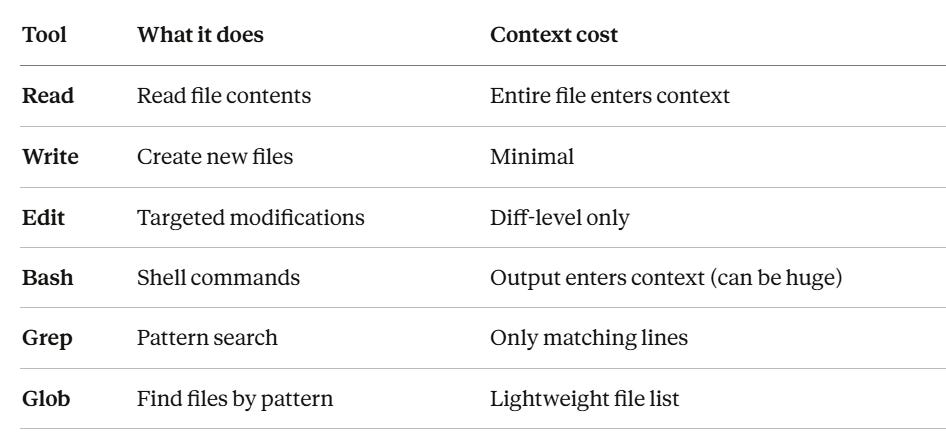
80% of your context consumption comes from file reads and tool results, not your messages. A 500-line file costs ~4,000 tokens. This is why Grep → Read (targeted) beats Read (entire file) for cost.
If you have MCP servers configured (.mcp.json for project, ~/.claude.json for personal), they connect now. Each server’s tool definitions get added to every API request.
Skills (.claude/skills/) load only their metadata (name + description, ~100 words each). The full skill body loads on demand when triggered. Progressive disclosure.
Phase 5: System Prompt Assembly
This is where cost starts accumulating. Claude Code concatenates everything into a system prompt:
Core identity instructions (~2K-4K tokens)
All CLAUDE.md content (~500-5K tokens)
First 200 lines of MEMORY.md (~200-1.5K tokens)
Tool definitions (~3K-7K tokens)
Skill metadata (~100-500 tokens)
Total: 6,000–18,000 tokens before you type a word.
Here’s why this matters: the system prompt is sent with EVERY API request. If you make 40 tool-use turns, that’s up to 720K tokens just from system prompt repetition.
Prompt caching saves you. Claude Code automatically caches the system prompt. After the first request, subsequent sends cost only 10% of standard input price. This is the single most impactful cost optimization built into Claude Code, and it’s automatic.
Phase 6: You Type — The Loop Begins
Your first message triggers the first API call. Then the agentic loop takes over:
You send message
  → Claude decides: respond or use a tool?
    → If stop_reason = "tool_use": execute tool, append result, send AGAIN
    → If stop_reason = "end_turn": display response, wait for next input
The compounding cost of turns: every turn resends the ENTIRE conversation history. Turn 1 might send 10K tokens. Turn 30 might send 180K. This is linear growth. Prompt caching softens it for repeated content, but unique tool outputs aren’t cacheable.
When context hits ~80-90% capacity, auto-compaction fires — summarizing earlier turns and discarding raw history. This is lossy. Critical details from early in the conversation can be lost. For important state, persist it to files Claude can re-read.
The Practitioner’s Cheat Sheet
Before the session:
Keep CLAUDE.md under 200 lines — every line enters the system prompt on every turn
Use
.claude/rules/for modularity instead of one massive fileNever hardcode secrets in
.mcp.json— use env var expansion
During the session:
/clearbetween unrelated tasks — stale context costs real moneyUse Grep before Read — 20 matching lines vs 8,000 tokens for a full file
Shift+Tabfor Plan mode — reduces token consumption 40-60% on complex tasks/model sonnetfor routine work — cheaper than Opus/costto check token usage
After the session:
/renamebefore/clearso you can--resumelaterPrune MEMORY.md periodically — stale memories waste tokens
What It Costs
Model Input Output Opus 4.6 $5/MTok $25/MTok Sonnet 4.6 $3/MTok $15/MTok Haiku 4.5 $1/MTok $5/MTok Batch API 50% off 50% off
Average: ~$6/developer/day for API users.
Cache reads cost 10% of input price. This is why prompt caching matters so much: your 5K-token system prompt, resent 40 times, costs $1.00 without caching or $0.12 with it.
The Full Lifecycle
$ claude
│
├─ 1. Authenticate (API key / OAuth / Bedrock / Vertex)
├─ 2. Load CLAUDE.md hierarchy (user → project → directory)
├─ 3. Load auto memory (first 200 lines of MEMORY.md)
├─ 4. Connect MCP servers
├─ 5. Register tools + skill metadata
├─ 6. Assemble system prompt + apply cache markers
├─ 7. Display cursor — waiting for input

├─ 8. You type a message
├─ 9. API request: system prompt + tools + message
├─ 10. Claude responds (text or tool_use)
├─ 11. If tool_use → execute → append → send again
├─ 12. Loop until stop_reason === "end_turn"
├─ 13. Save turn to local session storage
└─ 14. Wait for next input
Claude Code isn’t a chatbot with a terminal wrapper. It’s an agentic system managing authentication, configuration layering, memory persistence, tool orchestration, and context optimization on every session.
The most impactful optimizations are the simplest: lean CLAUDE.md, /clear between tasks, Grep before Read, and letting prompt caching do its job.
Now go type claude — and this time, you’ll know exactly what happens.