


TL;DR - Prompt caching stores the KV (key-value) computations from transformer attention layers so repeated prompt prefixes skip the expensive prefill step entirely. Every major provider now offers it, but they’ve made fundamentally different design choices: OpenAI caches automatically with zero code changes and now offers up to 90% discounts on newer models. Anthropic gives you explicit control with cache_control breakpoints and a strict hierarchy (tools → system → messages) that rewards careful prompt architecture. Google Gemini offers both implicit (automatic) and explicit caching with the longest TTL options — up to custom durations — plus per-hour storage fees for explicit caches. If you’re running a production AI application and haven’t optimized for cache hits, you’re leaving 50–90% of your inference budget on the table. Start by structuring your prompts with static content first and variable content last, then monitor cached_tokens in your API responses to measure your hit rate.
Why This Matters Right Now
Here’s a number that should make you uncomfortable: in a 100-turn coding session with Claude Opus, you’re sending roughly 10–20 million input tokens. Without caching, that’s $50–100 in input costs alone. With caching, it’s $10–19.
That’s not a hypothetical. The Claude Code team has said publicly that prompt caching is the architectural constraint around which their entire product is built. They declare SEV incidents when cache hit rates drop.
And it’s not just Anthropic. OpenAI’s Prompt Caching 201 cookbook (published February 2026) shows their Realtime API offering a 98.75% discount on cached audio tokens — from $32 per million tokens down to $0.40. Google’s Gemini 2.5 Pro drops cached input from $1.25 to $0.13 per million tokens.
The question isn’t whether to use prompt caching. It’s whether you understand it well enough to actually get the cache hits you’re paying for.
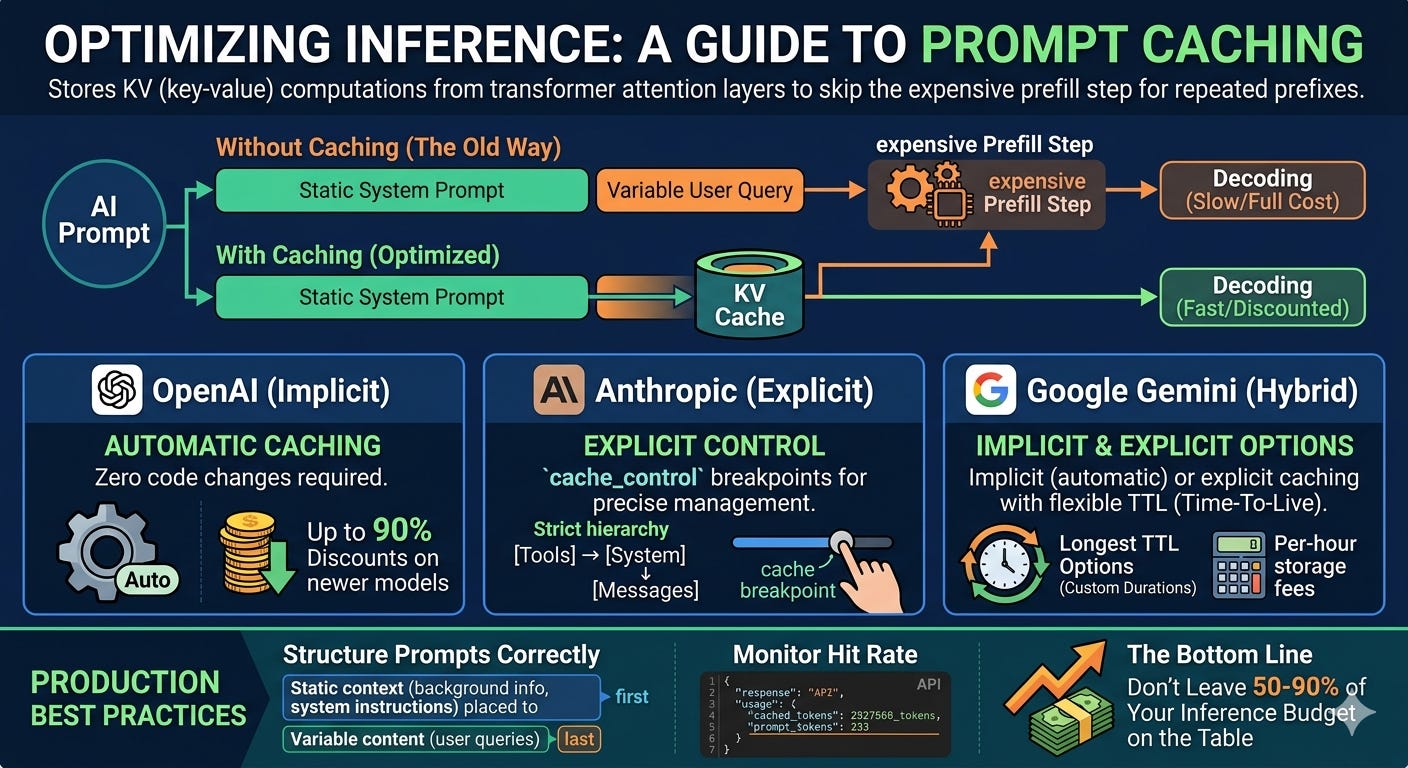
Prompt Caching
What’s Actually Being Cached (It’s Not What You Think)
A common misconception is that prompt caching stores your text and retrieves it later, like a Redis layer for prompts. It doesn’t work that way.
LLM inference has two phases. In the prefill phase, the model processes every input token through its transformer layers, computing key and value projections inside the attention mechanism. These projections — the “KV cache” — capture how each token relates to every other token in the sequence. In the decode phase, the model generates output tokens one at a time, each step referencing the KV cache it built during prefill.
Prompt caching stores those KV projections in GPU memory. When your next request starts with the same prefix, the model skips recomputing those attention layers and jumps straight to processing new tokens. You’re not caching text. You’re caching the result of the most computationally expensive part of inference.
This is why the savings are so dramatic. Prefill is the dominant cost driver — it scales with both sequence length and model size. Skip it, and you cut latency by up to 80% and costs by up to 90%.
It also explains why caching only works on prefixes. The KV cache is sequential. Token 500’s attention values depend on tokens 1–499. You can’t cache the middle of a prompt because the middle depends on everything before it.
The Three Approaches: A Design Philosophy Comparison
Each major provider has made distinct design choices about caching that reflect deeper philosophies about developer experience versus control.
OpenAI: “It Just Works”
OpenAI’s approach is fully automatic. There’s no flag to set, no API parameter to enable. If your prompt exceeds 1,024 tokens and shares a prefix with a recent request, the system attempts a cache hit behind the scenes.
The mechanism works through routing: OpenAI hashes the first ~256 tokens of your prompt and routes the request to a machine that recently processed a matching prefix. If that machine still has the KV cache in memory, you get a hit. Cache matches happen in 128-token increments — so if you change one token at position 2,048 in a 10,000-token prompt, you still get a cache hit on the first 2,048 tokens.
What’s unique about OpenAI’s approach:
Zero code changes required. You monitor cache performance by checking
usage.prompt_tokens_details.cached_tokensin the response — but you don’t need to do anything to enable it.prompt_cache_keyparameter. This is OpenAI’s concession to developers who want more control. By setting a consistent key across related requests, you improve the odds that they route to the same machine. Useful when many requests share a common long prefix.Extended retention. Beyond the default 5–10 minute in-memory cache, OpenAI offers extended retention (up to 24 hours) via the
prompt_cache_retentionparameter. Same pricing either way.Flex Processing. For latency-insensitive workloads,
service_tier="flex"gives you the same 50% Batch API discount but runs through the standard API, where you can tune cache locality more precisely. OpenAI’s own testing showed an 8.5% higher cache hit rate with Flex + extended caching versus Batch.
The trade-off: You have less deterministic control. Cache hits depend on routing, which depends on server-side decisions. You can influence routing with prompt_cache_key, but you can’t guarantee hits the way you can with Anthropic’s explicit breakpoints.
Anthropic: “You Decide What Gets Cached”
Anthropic takes the opposite approach. You explicitly mark what should be cached using cache_control parameters on individual content blocks. This gives you deterministic control — when you mark a block, Anthropic stores its KV projections and serves cache hits 100% of the time on matching prefixes (within the TTL window).
The key architectural detail is Anthropic’s strict processing hierarchy: Tools → System Message → Messages. Caching is cumulative along this chain, and changes at any level invalidate that level and everything below it. Change a tool definition? Your system prompt cache breaks too. Change the system prompt? Your conversation history cache breaks.
What’s unique about Anthropic’s approach:
Explicit breakpoints. Place
cache_control: {"type": "ephemeral"}on up to 4 content blocks. The cache stores everything from the beginning of the prompt up to that breakpoint.Automatic caching mode. Anthropic now also offers a simpler path: add a single
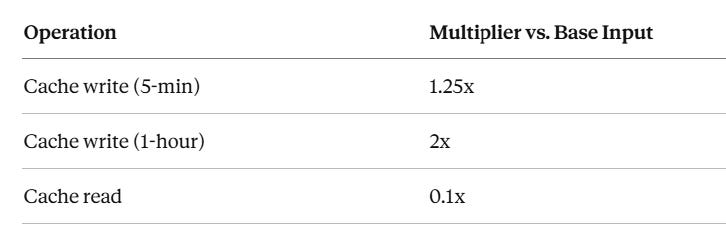
cache_controlat the top level of your request, and the system automatically applies the breakpoint to the last cacheable block and moves it forward as conversations grow.Cache write surcharge. Unlike OpenAI (no extra fee for cache writes), Anthropic charges 1.25x the base input price for 5-minute cache writes and 2x for 1-hour cache writes. Cache reads are 0.1x — so you need roughly 2 cache reads to break even on a 5-minute write.
Model-specific minimum thresholds. Claude Sonnet and Opus require at least 1,024 tokens to trigger caching. Claude Haiku 4.5 requires 4,096 tokens. Below these thresholds, your
cache_controlannotation is silently ignored.Extended TTL option. Beyond the default 5-minute window, you can set
"ttl": "1h"for a 1-hour cache at the 2x write premium.
The trade-off: More setup work, more things that can silently break (JSON key ordering in tool definitions, subtle changes in system prompts), but also more predictable behavior. When you ask for a cache, you get a cache.
Pricing multipliers (all models):
Operation Multiplier vs. Base Input Cache write (5-min) 1.25x Cache write (1-hour) 2x Cache read 0.1x
Google Gemini: “Choose Your Adventure”
Google offers both implicit and explicit caching — and they work differently enough that you need to understand both.
Implicit caching is automatic (enabled by default on Gemini 2.5 and newer). Like OpenAI, it detects repeated prefixes and applies discounts opportunistically. Unlike OpenAI, there’s no storage fee and no guarantee of savings — you get discounts only when the system determines a cache hit occurred.
Explicit caching is a managed resource. You create a cache object via the API, assign it a TTL (default 60 minutes, customizable), and reference it by resource name in subsequent requests. This guarantees discounts but introduces storage costs — typically $1.00 per million tokens per hour, depending on the model.
What’s unique about Google’s approach:
Longest TTL flexibility. Explicit caches can be set to custom durations with configurable
ttlorexpire_time. No other provider offers this level of TTL control.Storage fees for explicit caches. This is the critical differentiator. OpenAI and Anthropic don’t charge for cache storage. Google does — approximately $1.00 per million tokens per hour. This means you need to do break-even math: a 100K-token cache costs about $0.10/hour. If cached reads save you $0.10+ per hour in input token discounts, you’re ahead.
Multimodal caching. Gemini caches text, images, audio, and video — and each modality has different pricing for cached reads.
Cache lifecycle management. You can update TTLs, list caches, and delete them explicitly — a level of cache management that neither OpenAI nor Anthropic provides.
Pricing multipliers (Gemini 2.5 Flash example):
The Comparison Matrix That Actually Matters
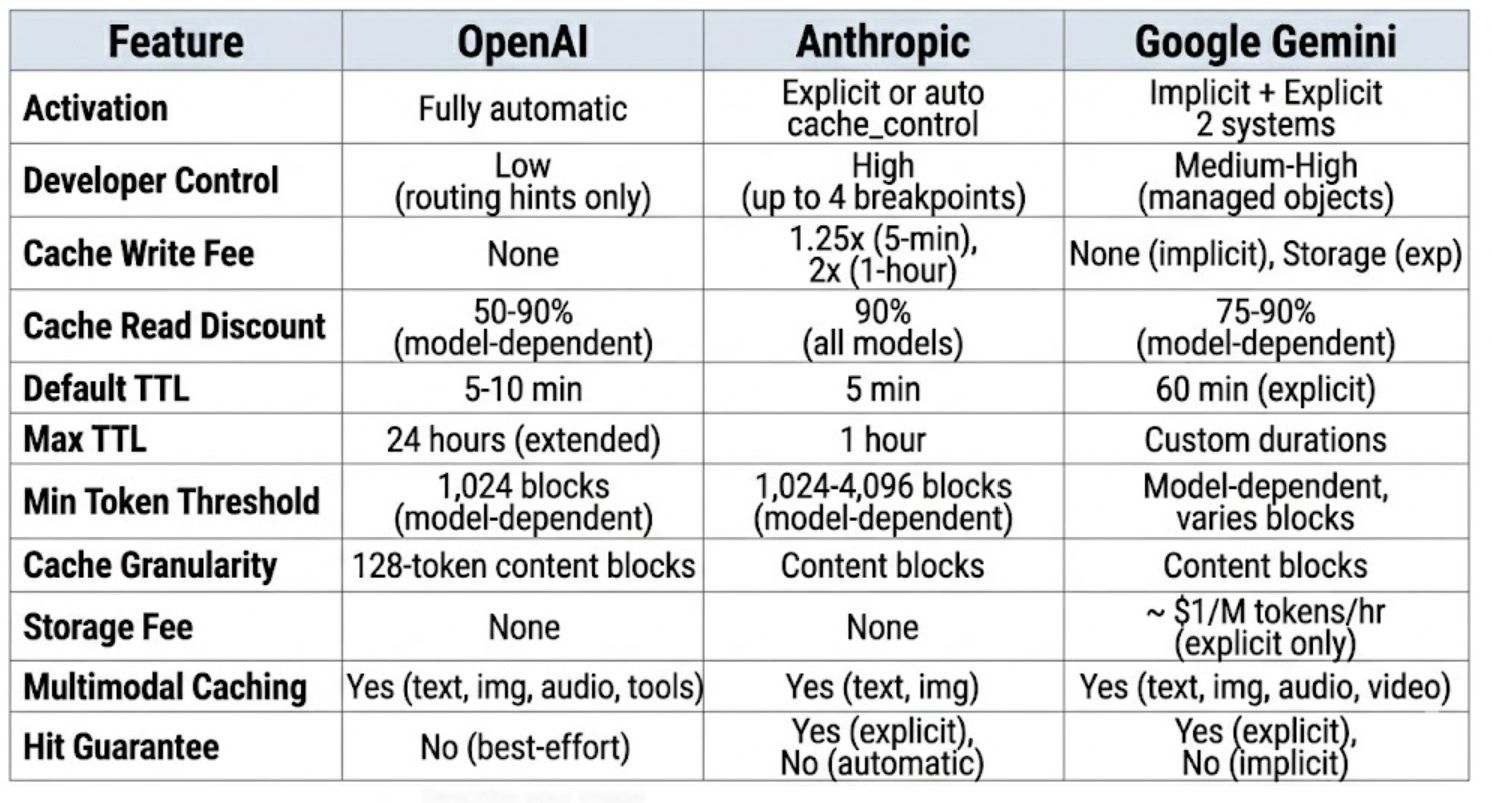
Comparison Matrix
The Five Use Cases Where Caching Transforms Economics
1. Multi-turn chatbots and agents. Every turn resends the full conversation history. Without caching, turn 50 costs 50x what turn 1 costs. With caching, turns 2–50 only pay full price for the new message — everything before it is a cache hit.
2. Document Q&A. Embed a 100K-token document in the system prompt and let users ask questions. Without caching, each question reprocesses the entire document. With caching, the document is processed once and subsequent queries against it cost 90% less.
3. Few-shot and many-shot prompting. High-quality few-shot examples can be 10K+ tokens. Caching lets you include 50–100 examples without paying full price on every call.
4. Agentic tool use. Agents make multiple tool calls per task, each requiring a new API request with the full context. Tool definitions and system instructions remain stable across calls — perfect cache candidates.
5. Code assistants. The canonical case. Claude Code’s system prompt alone is ~4,000 tokens. Add tool definitions, CLAUDE.md files, and conversation history, and you’re sending 100K+ tokens per turn. Caching keeps this economically viable.
What Breaks Your Cache (And How to Prevent It)
The most expensive bug in production AI isn’t a wrong answer — it’s a silently broken cache. Here’s what invalidates caches across providers:
Universal cache killers:
Changing any token in the cached prefix (even a single character)
Reordering JSON keys in tool definitions (watch out for languages like Go and Swift that randomize key order)
Adding timestamps or per-request IDs to system prompts
Switching models mid-session
Anthropic-specific:
Changing
tool_choiceparameterAdding or removing images anywhere in the prompt
Enabling/disabling extended thinking or changing the thinking budget (invalidates message-level cache, but system and tool caches survive)
Exceeding 20 content blocks without additional
cache_controlmarkers
OpenAI-specific:
High request volume on the same prefix (>15 RPM per
prompt_cache_key) causing overflow to additional machinesThe routing hash only considers ~256 tokens — so two prompts that differ only after token 256 might route to different machines
Google-specific:
Explicit caches can expire if TTL isn’t updated
Referencing a deleted or expired cache object causes request failure (implement retry logic that recreates the cache)
Practical Prompt Architecture for Maximum Cache Hits
The universal rule across all providers: static content first, variable content last.
Think of your prompt as having concentric layers of stability:
Most Stable (cache these)
├── Tool definitions
├── System instructions
├── Reference documents / few-shot examples
├── Conversation history (grows but prefix stays stable)
└── Current user message
Most Variable (don't try to cache this)
For Anthropic, place your first cache_control breakpoint after your system instructions and a second after your reference documents. Use automatic caching mode for the conversation history — it moves the breakpoint forward as the conversation grows.
For OpenAI, structure is the only lever you have (plus prompt_cache_key). Put your most stable, longest content at the very beginning. Don’t embed per-request metadata in your system prompt.
For Google, create an explicit cache for your reference documents and set an appropriate TTL. Use implicit caching for everything else.
The Decision Framework: Which Provider’s Caching Fits Your Use Case?
Choose OpenAI’s caching when you want zero implementation effort, you’re running standard chat or completion workloads, and you value simplicity over control. The newer GPT-5 family’s 90% discounts make this increasingly attractive.
Choose Anthropic’s caching when you need guaranteed cache hits, you’re building long-context applications (document analysis, code assistants), and you’re willing to invest in prompt architecture. The explicit control means you can debug and optimize with certainty.
Choose Google’s caching when you’re working with multimodal content (especially video and audio), you need long cache durations, or you’re already in the Google Cloud ecosystem. Be aware of storage fees — do the break-even math.
Monitoring: The Metric That Tells You If You’re Doing It Right
Regardless of provider, there’s one metric you should track: cache hit rate, defined as cached tokens divided by total input tokens.
For OpenAI, check usage.prompt_tokens_details.cached_tokens in every response. For Anthropic, monitor cache_read_input_tokens versus cache_creation_input_tokens plus input_tokens. For Google, look at cachedContentTokenCount in the response metadata.
A healthy production system should see 70%+ cache hit rates after the first few requests in a session. Claude Code reports 95%+ in sustained coding sessions. If you’re below 50%, something is breaking your cache — review the invalidation checklist above.